What is Landing Page? How to create a professional Landing Page
Hoc Tai
532 views
Table of Contents
In online business, Landing Page is not just a simple website but a “weapon” that helps small businesses and shop owners close deals faster. This is where visitors make purchasing decisions, leave information or register for services. In this article, you will understand what Landing Page is, why you need it, and how to create an effective Landing Page from A-Z to increase sales without knowing programming.
What is a Landing Page?
Before learning how to create a Landing Page, you need to understand the basic concept. A Landing Page is a standalone webpage, usually designed to serve a specific purpose: Selling products, collecting customer information (leads), or calling for action (CTA).
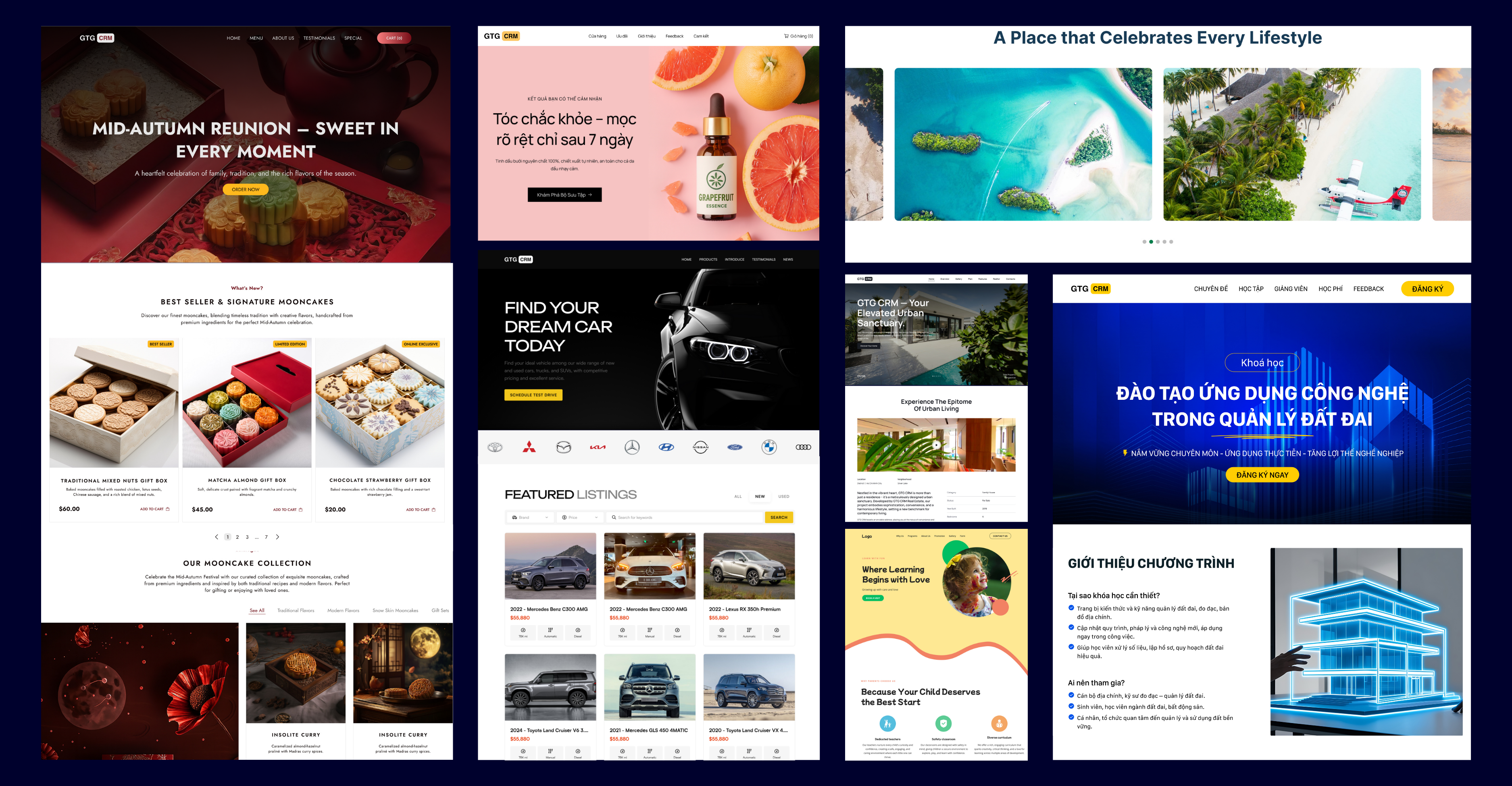
GTG CRM Landing Page Templates
Unlike a regular website with multiple sections, a Landing Page focuses on a single objective. For example: A fashion shop can create a separate landing page for its men's shirt collection, instead of directing customers to a homepage with too many products that cause distraction. Why do online shop owners & SMEs need a landing page? At this stage, many small shop owners often wonder: “I already have a fan page, do I need a landing page?” The answer is yes. A landing page is the clearest “place to close a sale,” where you control all the messaging, images, and the customer journey. Unlike a fan page or e-commerce platform, a landing page is entirely your property. You can run ads, add lead generation forms, set up live chat, and analyze customer behavior on one platform. This is an essential tool if you want to increase conversion rates and optimize marketing costs.
How to create an SEO-friendly Landing Page for online shop owners & SMEs
To help you visualize more clearly, here is a detailed guide on how to create a Landing Page that suits your business goals.
Step 1: Define your Landing Page goals
Before learning how to create a Landing Page, you need to be clear: What do I want that page to do? If the goal is to generate leads, you need a prominent registration form. If you want to create a sales Landing Page , the "Buy Now" CTA must be placed strategically. If running an event campaign, you need a countdown timer to create FOMO.
A clear goal will determine the structure, content and features you need on your landing page.
Step 2: Design Your Landing Page
If you don't have design expertise, you can hire a landing page design company to create a landing page according to your requirements. The price for a complete landing page can range from 11 million VND to 15 million VND.
If you find hiring a designer too expensive, and designing it yourself is too time-consuming, then this is the time to look for landing page creation tools with ready-made templates industry.
With GTG CRM, you just need to choose the appropriate template (cosmetics, fashion, F&B, real estate…), then drag and drop to edit content and images. No coding knowledge required, in just 10 minutes you'll have a complete sales landing page. If you still haven't found a suitable landing page template, you can request GTG CRM to create a completely new one for you.
Step 3: Write SEO-optimized content with AI
Most online shops struggle with writing headlines, meta descriptions, or CTAs. The content is often lengthy, unappealing, and lacks keywords. This is why advertising is ineffective.
To get your landing page to the top of search results, you must pay attention to the following 4 things:
1. Headline (H1) - The first headline that appears on your Landing Page
- This is the deciding factor in whether customers stay or leave
- Principle: Concise (6-12 words), contains the main keyword, and also highlights the direct benefit of the product/service
- Length 140-160 characters, Contains Main keywords, And hints at benefits + CTA
- Formula: [Product/Service] + [Main benefit] + [Call to action]
- Opening paragraph: Briefly explain the customer's problem (pain point), then offer a solution (your product/service)
- Subsequent sections: Use H2/H3 sections containing secondary keywords (e.g., Benefits of creating a Landing Page, How to collect customers from a Landing Page, How is a Landing Page different from a Website?)
- Clear CTA: Place "Register Now", "Try Free", "Get a Consultation" buttons in multiple locations, at least at the top, middle, and bottom of the page
- H2: Why do online shops need Landing Pages to sell?
- Paragraph: Explain the reason + insert CTA → “Create a Landing Page with GTG CRM in just 10 minutes”
- Hero image (large image at the top of the page): Used to convey core benefits/values, recommended horizontal size 1600-1920px
- Product/service image: Optimized 45° angle, clean background; If it's a service, use a process simulation image or “before-after”
- Contextual image (lifestyle/use-case): Shows the product being used in a real context → increases credibility
- Testimonial/case image: Customer portrait + short quote
- Icon illustrating benefits: 3-6 simple icons, consistent with brand colors
- Image file name: No accents, includes main/secondary keywords (e.g.: landing-page-ban-hang-my-pham.webp)
- Alt text (8–12 words): Image description + cleverly insert keywords, avoid keyword stuffing (e.g.: “Vitamin C brightening serum on a wooden background – cosmetics landing page”)
- Format: Priority: WebP for illustrative images; PNG for logo (transparent background)
- Size & file size: Ensure image fits the display frame; size < 300KB (hero < 500KB)
- Consistency: A consistent visual style (lighting, color tone) to enhance the feeling of professionalism.
- Choose a Live Chat tool: You can use popular platforms such as Tawk.to (free), Crisp, or LiveChat. They allow you to create a chat widget in just a few minutes. Insert into Landing Page: After registering, you will receive a code snippet. Insert this code into the section or before the tag of the Landing Page. If using a pre-made Landing Page creation platform, simply paste the code into the "Custom Script" or "Chat Plugin" section. Outsource if needed: : If you are not familiar with technical operations, you can hire a freelancer on Fiverr, Upwork, or a small agency to help with the integration. Costs usually range from a few hundred thousand to a few million depending on needs.
- Test display on multiple devices: View the Landing Page on desktop, tablet, and mobile to ensure there are no layout breaks.
- Check page load speed: Use Google PageSpeed Use Insights or GTmetrix to check and optimize images and scripts to make the page load in under 3 seconds
- Test the registration form: Enter a test email/phone number to ensure the information is sent and you receive a response (email, SMS)
- Check the link & CTA button: Ensure all buttons (Buy Now, Register, Contact…) are working correctly
- Ask friends/colleagues to test it: Send the link to a few people to get their feedback on the experience, helping you identify any remaining minor errors
Example: Instead of writing “Premium men's leather shoes”, write “Premium men's leather shoes – Lasts over 2 years, 30% off today”.
2. Meta Description - The description displayed on Google
Example: “SEO-optimized sales landing page helps online shops double orders. Try GTG CRM for free today!”.
3. Content on the page - Breakdown and optimization of keywords
Specific Example:
Step 4: Find illustrative images
A Landing Page lacking professional illustrative images will have difficulty retaining customers. First, you need to determine the size of the images you need to use. Typically, a Landing Page will include the following types of images:
Note:
Step 5: Add the registration form and collect customer data.
To optimize conversions, you should place the form right in the hero section or near important CTAs. The form should be concise, only collecting essential information such as name, email, and phone number. Personalize the form title (e.g., “Register now to get a 20% discount”) and use a clear CTA button.
Step 6: Activate Live Chat and diverse messaging channels
To allow visitors not only to read information but also to interact directly, you need to integrate Live Chat or familiar messaging channels. This is a bridge that helps businesses respond instantly and create a professional feeling for customers.
Besides Live Chat, don't forget to add the Messenger Chat Plugin (Facebook provides it for free) or the Zalo OA button so customers can choose the channel they are most familiar with.
Step 7: Check and optimize before launching
Before launching the Landing Page, you need to check everything to ensure everything works smoothly and creates a seamless experience for customers:
Suggested tools for creating Landing Pages
1. GTG CRM: Allows customers to drag and drop to design, choose industry-specific templates, uses AI to write SEO-optimized content, and create images instantly. Every landing page integrates Live Chat, lead generation forms, and data synchronization with CRM. You can also add Messenger and Zalo to chat directly with customers, turning visitors into orders on the spot.
2. Ladipage.vn: Strength lies in many beautiful, easy-to-drag templates. However, it lacks integrated CRM customer management features.
3. Haravan.com: Strong in e-commerce, but focuses more on online sales than personalized marketing content.
4. GetResponse: An international, multi-functional tool, but expensive and complex for SMEs
Conclusion
Creating an effective landing page isn't just about building a website, but about creating a "sales closing machine" for online shops and SMEs. With a SEO-optimized landing page, brand-synchronized, integrated Live Chat and CRM, you'll save costs and significantly increase your closing rate. If you want to experience the difference, try GTG CRM for FREE! - A platform that helps you create a landing page in 10 minutes without needing technical or design expertise.
Maybe You Should Read These
In-depth Analysis of Factors Optimizing Google Ads Effectiveness

No more forgotten Leads: Automate management, increase conversion rate 3 times

Top 03+ lean business models "reign" during economic recession
Google Ads Recommendations: When to Listen, When to Ignore
Top 3 Facebook Ad Content Errors That Cause Wasted Budget