What is meta description? How to optimize meta description for SEO
Hoc Tai
532 views
Table of Contents
Meta description is a short description that appears under the page title on Google, and it is a big factor in whether users will click on your website or not. Written correctly, it acts as a “free advertisement” that increases CTR, attracts the right audience, and indirectly supports rankings. This article guides you through a 7-step process to write - Implement - Measure SEO-standard meta descriptions and apply them immediately, even if you are just starting out.
What is a Meta Description?
A meta description is a tag that describes the content of a webpage (usually 120-160 characters), which search engines choose to display under the title. It is not a ranking factor directly, but it strongly impacts the click-through rate (CTR). When the description clearly highlights the benefits and contains keywords that match the query, users tend to click more, and a good CTR helps your page become more "favored" over time.

What is a Meta Description? Why is it important?
Three fundamental principles before writing
Stick to the search intent, a clear benefit, and concise length. Users are looking for quick answers to their problems, you need to show them “Why should you click on this page now?”. The ideal length should be around 140-155 characters to include enough information without being truncated in search results. Avoid generic, vague descriptions or keyword stuffing.
7-Step Meta Description Optimization Process
Step 1: Identify Search Goals and Keywords
Choose one main keyword that accurately reflects the user's search intent. For knowledge blogs, this is often a keyword like "what is," "how to," "guide," etc. For sales pages/landing pages, prioritize transactional keywords ("price," "buy," "service," etc.). Before you have a keyword research tool, you can type keywords into Google to see suggestions, "people also ask" and titles of top-ranking pages, and from there deduce the language that searchers are actually using.
Step 2: Identify the reader and the benefit of a sentence
Write a sentence describing who will read it and the specific benefit they will receive when clicking on the page. For example: "New shop owner doing SEO" + "5-minute checklist to do immediately". This benefit sentence is the “soul” of the meta description, helping you avoid falling into a dry list of features.
Step 3: Choose a suitable writing “formula”
You can use the following sentence structures (fill in the blanks), then adjust the text to make it smoother:
- Problem → Solution → Result + CTA: “Having trouble increasing CTR? Learn how to write SEO-friendly meta descriptions that align with search intent to attract clicks. See the detailed guide now.”
- Target Audience → Benefit → Differentiation: “For small businesses: Optimize meta descriptions step-by-step, with real-world examples and sample forms to fill in Quick. Apply in 10 minutes.”
- Features → Benefits → CTA: “SEO-friendly meta description: Standard length, natural keywords, persuasive CTA. Download template and start optimizing today.”
- Length around 140-155 characters, read smoothly
- Contains 1 main keyword naturally, prioritized to appear early
- State the benefits accurately, avoid vague slogans (“top quality”, “good price”)
- Use soft CTAs (view now, download template, apply quickly…)
- Each page has a different description, no repetition between pages
- Maintain the actual content on the page
Step 4: Write a draft of 140-155 characters, including the main keyword early
Compose 2-3 different versions, in which the main keyword appears naturally in the first half of the sentence. Each version should highlight one key benefit; don't try to cram too much information in.
Example (for this article):
“What is a meta description? A step-by-step guide to writing SEO-optimized descriptions that match search intent, significantly increasing CTR for your blog/landing page. Check it out now.”
Step 5: Add a soft CTA to motivate clicks
End the description with an invitation that makes the reader think “what they will get if they click”: “Check it out now”, “Download template”, “Apply in 5 minutes”, “Learn step by step”. The CTA should be concise, not overly sales-oriented, and appropriate to the content context.
Step 6: Add the description to the page and check its display.
In HTML, insert:
If you are using a CMS (WordPress, Shopify…), go to the
SEO/Meta description section of each page.
Step 7: Monitor CTR and optimize periodically.
After publishing, open Google Search Console → Performance → Pages, select the page you just optimized to view Impressions/CTR/Clicks. If after 2-4 weeks the CTR is still low compared to the average query, go back to Step 4 to try a different description: Emphasize the benefits more, shorten the wording, or adjust the CTA. Repeat the write-attach-measure cycle until the CTR improves.
Quick practice: Write meta descriptions for 4 types of pages
Knowledge blog page
Example: “What is a meta description? A 7-step process for writing a standard SEO meta description, with a quick fill-out template and real-world examples. Apply now to increase CTR.”
Product/Service Page
Suggested Formula: Problem → Benefit → Trust Factor + CTA.
Example: “Complete SEO service package to increase natural traffic , optimize technical and safe content. Transparent pricing, clear contract. Get a consultation.”
Category Page
Suggested Formula: Product range + selected benefits + assurance signal.
Example: “Standard SEO landing page template, optimized for conversions for SMEs: Clear layout, fast loading, easy to edit. Explore the latest template set.”
GTG CRM Landing Page
Suggested formula: Main feature + quick operation benefits + CTA.
Example: “Create a landing page and write SEO-optimized meta description directly in GTG CRM. Preview snippet, publish quickly, and easily track performance.”
60-second checklist before clicking “Publish”
Common mistakes and quick fixes
Your ads may not be optimized if you make the following mistakes:
1. Many descriptions are cut off midway because they are too long; shorten the last clause or remove the cumbersome defective clause
2. Others stuff keywords, making the sentence stiff and unconvincing. Keep one main keyword and turn the rest into specific benefits. 3. The most serious mistake is duplicate descriptions across multiple pages, making it difficult for Google to distinguish them. Prioritize descriptions that reflect the specific intent of each URL. 4. Finally, don't promise something that isn't there - Google can automatically create a different description if it sees yours doesn't match the content.
GTG CRM - Helps you implement SEO-optimized advertising content
If you need to write blog posts to run ads but don't have time to research or test multiple versions, try GTG CRM - a platform that helps you easily advertise on Google with just a few steps.
Instead of racking your brains thinking about how to write SEO-optimized titles and meta descriptions that are attractive enough, you can let GTG CRM's AI handle it. Your job is simply to click, the content optimization part is automatically suggested and completed by the system.
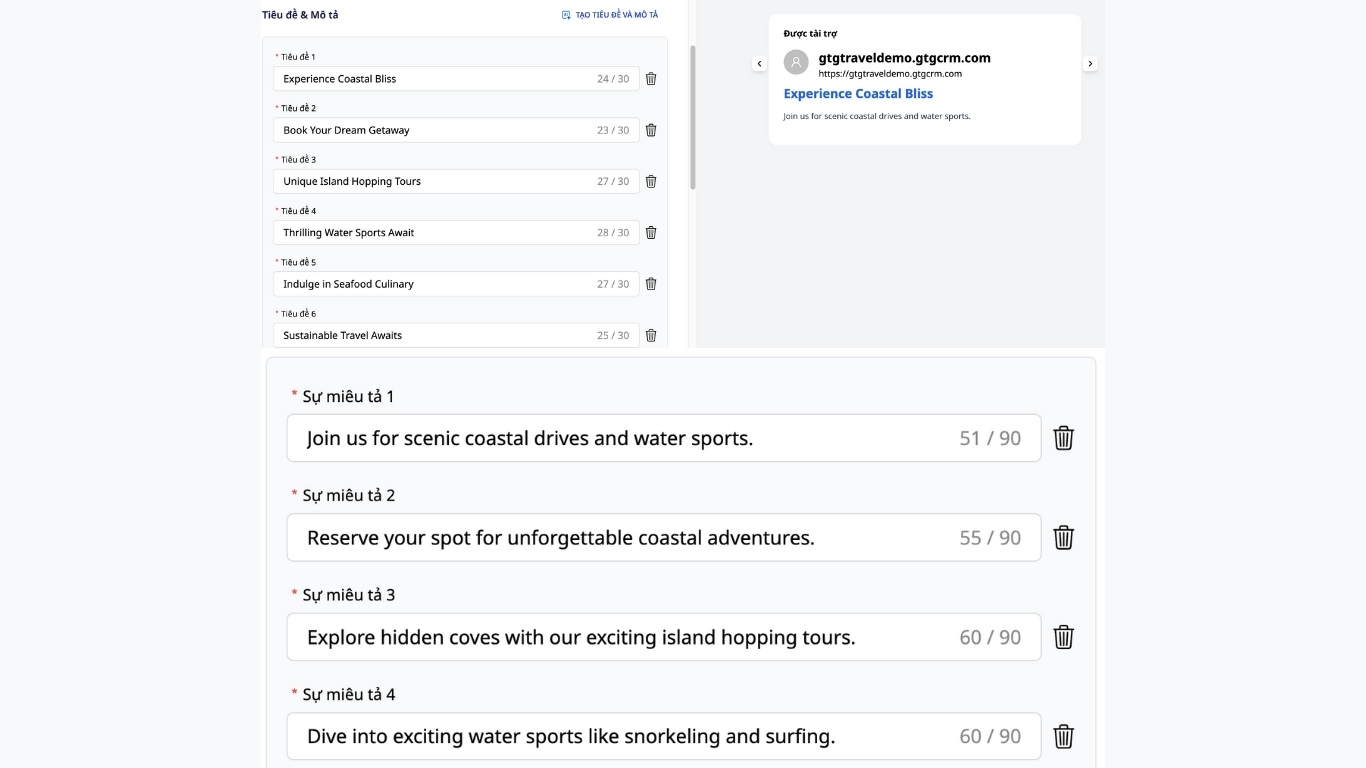
AI helps you create SEO-friendly titles and meta descriptions, optimizing your advertising campaigns
Conclusion
Meta descriptions don't rank for you, but they bring users to your page. Stick to intent, state benefits clearly, add a soft CTA, keep it at a suitable length, and most importantly, measure to rewrite it better. GTG CRM is the tool that helps you create SEO-friendly meta descriptions.
Maybe You Should Read These

GTG CRM - The Best Social Media Multi-Channel Management Tool 2025

Optimize every touchpoint on the customer journey with GTG CRM's Omnichannel Messaging

GTG CRM: Customer management solution to increase loyalty and optimize sales efficiency

5 steps to create effective content, attracting tens of thousands of potential customers

Not targeting the right people? 4 steps to create customer portraits with GTG CRM