Automations: Smart, time-saving care scenarios for small businesses
Alex Pham
532 views
Table of Contents
Why is automating the customer care process necessary?
In business, not all customers buy on their first try. They need advice, reminders, and care to gradually make a decision. For small businesses, manually tracking each customer is almost impossible: It's easy to miss customers, responses are slow, and sales opportunities are lost. In reality, many shop owners, startups, and SMEs face the following:
- Consultation appointments are forgotten.
- Follow-up emails are sent late or incompletely.
- Reminder messages are not sent in time when customers are interested.
-
- Automates customer care scenarios.
- Ensures customers always receive the right message at the right time.
- Saves 15 hours per week compared to manual work.
- Create drag-and-drop scenarios: No coding required, just select the condition (e.g., customer fills out a form and leaves information) → assign an action (send a welcome email or send a welcome message).
- Personalize the message: Instead of sending the same content to everyone, the workflow allows you to set up a custom script based on customer behavior. Example: Customer does not respond after 3 days → the system assigns a staff member to call directly.
- Saves time & manpower: Once set up, the system runs automatically 24/7, you only need to monitor the reports.
- Check the form → send a thank-you email.
- Schedule a consultation via text message.
- After 2 days, send another reminder message.
- If the customer does not respond, assign a staff member to call.
-
- When the customer fills out the form, the system automatically sends a thank-you email with a brochure.
- After 1 day, if the customer has not responded, the system will send a reminder message schedule.
- After 3 days, if there is still no response, the workflow will assign a customer service representative to call directly.
- No customer missed: Every lead is nurtured.
- Save time: Instead of repetitive manual work, you focus on business development.
- Increase conversion rate: Customers are cared for at the right time, on the right channel, with the right message.
- Increase customer experience: Consistency makes customers feel more professional and trusting.
With Automations in GTG CRM, everything is automated according to your settings:
Everything happens automatically, you don't need to remember or manually operate it.
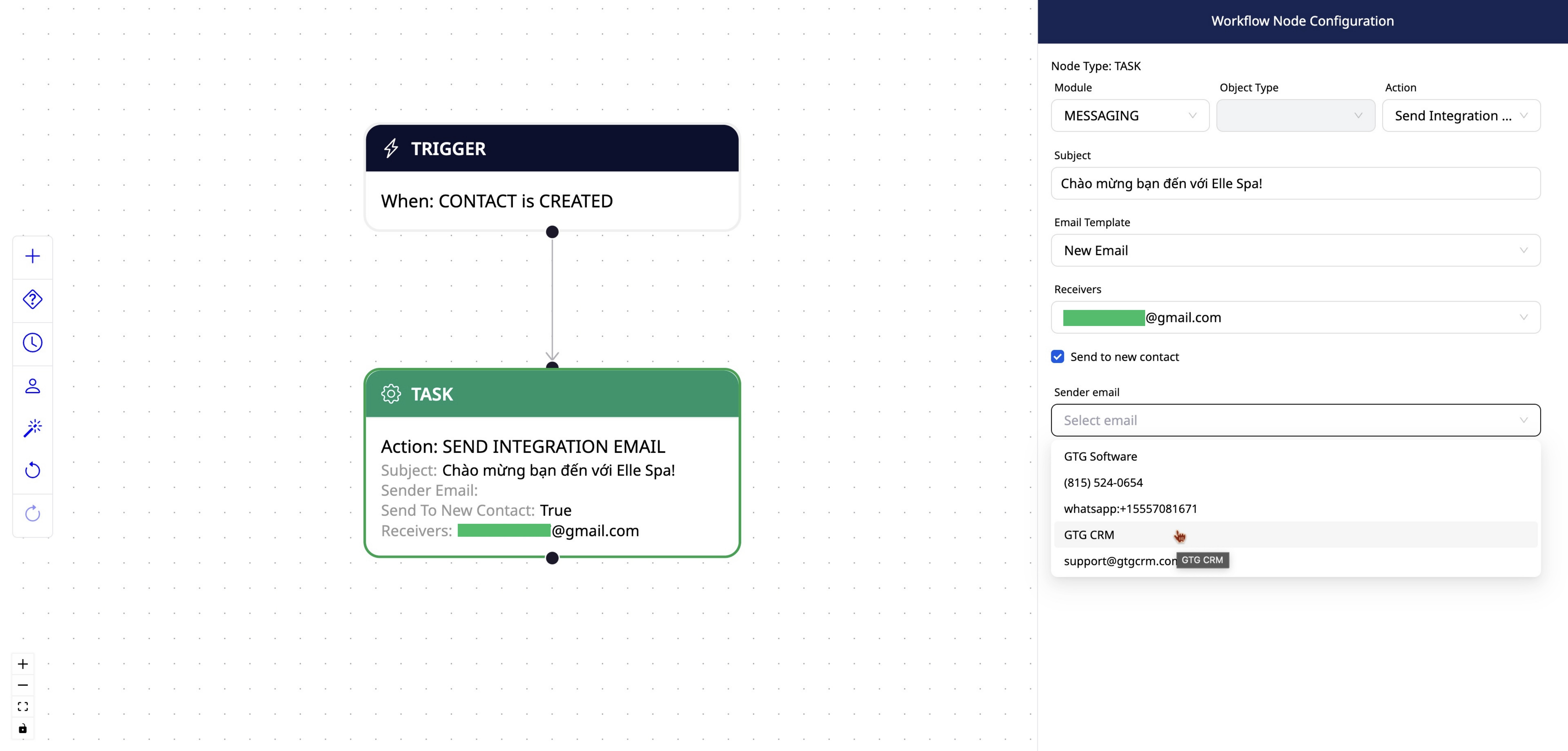
GTG CRM's Automation Workflow helps you set up customer care scenarios automatically action
Benefits for small businesses
Conclusion
discussionAutomations It's not just a tool to "get things done faster," but also a leap forward in how SMEs take care of their customers. With GTG CRM, you can easily create smart customer care scenarios, automate processes, and ensure you don't miss any customers.
This is why process automation becomes a mandatory tool if you want to operate efficiently and effectively.
Automations in GTG CRM - A Solution for SMEs
GTG CRM offers the following features: Automations helps small businesses:
The highlight of Automations is its ease of use, intuitive interface, and suitability for even beginners.
Real-life situation
You own a small spa. Every day dozens of customers register for treatment consultations through a form on your website. If done manually, you must:
Maybe You Should Read These

Brand Identity: Build a solid brand foundation in minutes with AI

GTG CRM's CRM Module: Lean Customer Management Solution
AI in GTG CRM: Comprehensive marketing assistant for small businesses

Access Level Control in GTG CRM: Keep data safe, clear authorization
AI Assistant in GTG CRM: Virtual Assistant for Small Businesses