Access Level Control in GTG CRM: Keep data safe, clear authorization
Alex Pham
532 views
Table of Contents
As small businesses grow, they face a familiar challenge: the more employees involved, the more fragmented data becomes and the higher the risk of errors. A single misstep or deletion of a landing page, an incorrect campaign edit, or a customer contact leak can cause major damage.
To solve this, GTG CRM offers the feature Access Level Control, allowing business owners to control in detail “who can do what” in the system. This is a data security tool, reduces errors and clarifies the responsibilities of each member.
Why is Access Level Control important?
- Data Security: Employees only access within their authorized scope.
- Minimize Errors: Avoid accidentally editing or deleting important data.
- Clear Responsibilities: Marketing focuses on content and campaigns, sales manages contacts and invoices, and admin acts as the overall manager.
Default Roles
GTG CRM provides 3 main roles to meet the operational needs of SMEs.
1. Administrator - Full System Access
Administrator is the highest role, usually reserved for the business owner or administrator. A person with this privilege
controls the entire system, including:
-
Landing Page:
create, update, clone, publish/unpublish, delete, and edit custom domains.
-
Social:
create, update, publish/unpublish, delete, connect, and view posts.
-
Campaigns (Ads):
view, create, update, and delete campaigns; enable/disable; Connect Ads.
-
Messaging:
Connect/disconnect accounts, send messages, view all messages.
-
Automation Workflow:
Create, view, update, and delete workflows.
-
CRM Objects:
Create, update, import, assign, view, and delete.
-
Contacts:
View all contacts.
-
Email:
Send emails.
-
Global:
Manage general configurations.
Administrator has full Permissions on most modules, ensuring overall control.
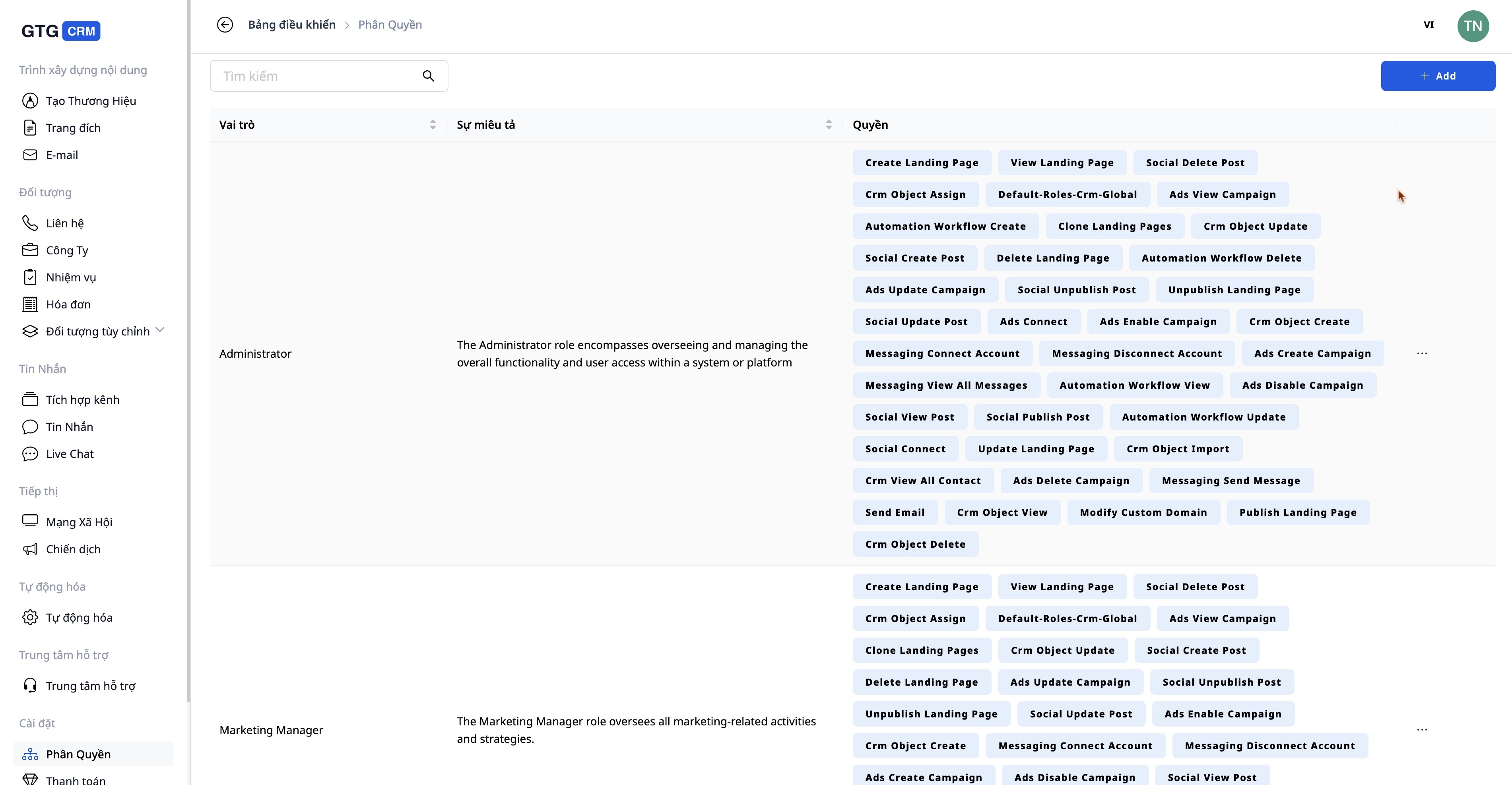
Flexible permissions for each personnel position
2. Marketing Manager - Marketing Campaign Manager
The Marketing Manager is responsible for all marketing and communication activities, with the following permissions:
-
Landing Page:
create, clone, edit, publish/unpublish, delete.
-
Social:
create, update, publish/unpublish, delete, view posts.
-
Campaigns (Ads):
view, create, update, delete campaigns; Enable/Disable.
-
Messaging:
Connect/disconnect accounts, send messages (cannot view all messages).
-
CRM Objects:
Create, update, assign, import, delete.
-
Email:
Send emails.
Marketing Manager focuses on campaign deployment and content management, but does not have full authority like an Administrator.
3. Marketing Staff - Daily Task Execution
Marketing Staff have sufficient authority to complete basic tasks, appropriate for marketing staff in the team.
-
Landing Page:
Create, clone, edit (no publish/unpublish or delete).
-
Social:
Create posts, update posts, view posts (no publish/unpublish or delete).
-
Campaigns (Ads):
View, create, update campaigns (no enable/disable, no delete).
-
Messaging:
Only have the right to send messages.
-
CRM Objects:
Create, update, import, view.
-
Email:
Send email.
Marketing Staff do not have the right to delete and restrict deep administrative privileges, in order to avoid system risks.
Custom Roles
The strongest point of
Access Level Control
is the ability to create your own roles. Business owners can enable/disable individual permissions:
-
Automation Workflow:
Create, view, update, delete.
-
Landing Page:
Create, clone, publish/unpublish, delete.
-
Social:
Connect accounts, create/update/delete posts.
-
Messaging:
Connect accounts, send messages, view messages.
-
CRM Objects:
Create, update, import, delete.
-
Email:
Enable/disable sending permission email.
Example:
-
Customer service staff only need to view and reply to messages; they don't need permission to edit the landing page.
-
External collaborators only need to view the contact list and send emails; they are not allowed to access other data.
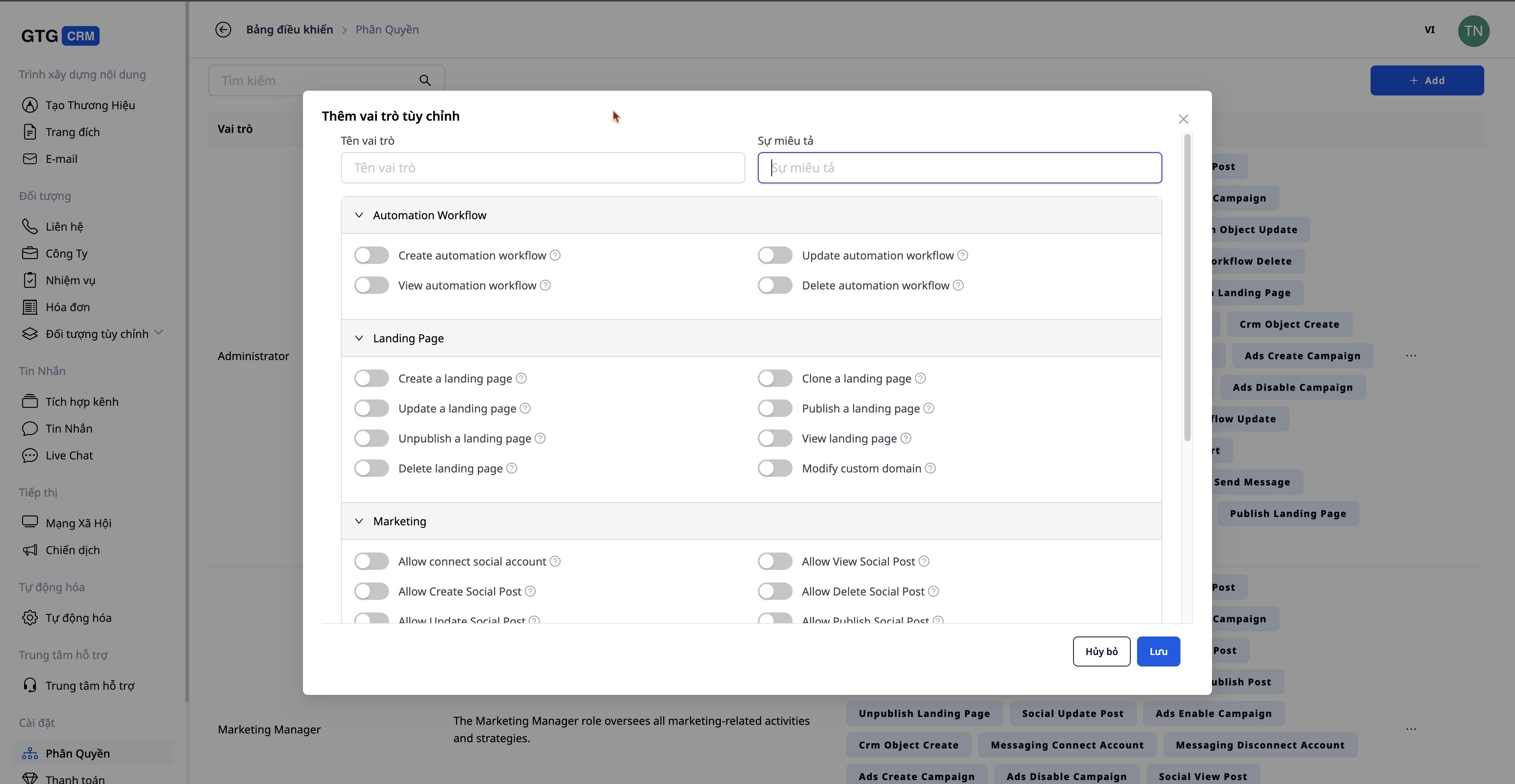
Flexible customization of permissions as desired
Benefits for SMEs
-
Tight control:
Prevents employees from overstepping their authority or making mistakes.
-
Data security:
Only authorized personnel can access sensitive information.
-
Flexible operation:
Permissions can be assigned by department or individual.
-
Easy to use:
No advanced technical skills are required; business owners can set it up themselves.
Conclusion
Access Level Control
In GTG CRM, it helps small businesses operate more professionally, clearly, and securely. Each person does only their job, the data is always under control, and the system is flexible enough to scale.
- Landing Page: create, clone, edit, publish/unpublish, delete.
- Social: create, update, publish/unpublish, delete, view posts.
- Campaigns (Ads): view, create, update, delete campaigns; Enable/Disable.
- Messaging: Connect/disconnect accounts, send messages (cannot view all messages).
- CRM Objects: Create, update, assign, import, delete.
- Email: Send emails.
- Landing Page: Create, clone, edit (no publish/unpublish or delete).
- Social: Create posts, update posts, view posts (no publish/unpublish or delete).
- Campaigns (Ads): View, create, update campaigns (no enable/disable, no delete).
- Messaging: Only have the right to send messages.
- CRM Objects: Create, update, import, view.
- Email: Send email.
- Automation Workflow: Create, view, update, delete.
- Landing Page: Create, clone, publish/unpublish, delete.
- Social: Connect accounts, create/update/delete posts.
- Messaging: Connect accounts, send messages, view messages.
- CRM Objects: Create, update, import, delete.
- Email: Enable/disable sending permission email.
- Customer service staff only need to view and reply to messages; they don't need permission to edit the landing page.
- External collaborators only need to view the contact list and send emails; they are not allowed to access other data.
- Tight control: Prevents employees from overstepping their authority or making mistakes.
- Data security: Only authorized personnel can access sensitive information.
- Flexible operation: Permissions can be assigned by department or individual.
- Easy to use: No advanced technical skills are required; business owners can set it up themselves.
Administrator has full Permissions on most modules, ensuring overall control.
Flexible permissions for each personnel position
2. Marketing Manager - Marketing Campaign Manager
The Marketing Manager is responsible for all marketing and communication activities, with the following permissions:
Marketing Manager focuses on campaign deployment and content management, but does not have full authority like an Administrator.
3. Marketing Staff - Daily Task Execution
Marketing Staff have sufficient authority to complete basic tasks, appropriate for marketing staff in the team.
Marketing Staff do not have the right to delete and restrict deep administrative privileges, in order to avoid system risks.
Custom Roles
The strongest point of
Access Level Control
is the ability to create your own roles. Business owners can enable/disable individual permissions:
Example:
Flexible customization of permissions as desired
Benefits for SMEs
Conclusion
Access Level Control
In GTG CRM, it helps small businesses operate more professionally, clearly, and securely. Each person does only their job, the data is always under control, and the system is flexible enough to scale.
Marketing Manager focuses on campaign deployment and content management, but does not have full authority like an Administrator.
3. Marketing Staff - Daily Task Execution
Marketing Staff have sufficient authority to complete basic tasks, appropriate for marketing staff in the team.
Marketing Staff do not have the right to delete and restrict deep administrative privileges, in order to avoid system risks.
Custom Roles
The strongest point of
Access Level Control
is the ability to create your own roles. Business owners can enable/disable individual permissions:
Example:
Flexible customization of permissions as desired
Benefits for SMEs
Conclusion
Access Level Control
In GTG CRM, it helps small businesses operate more professionally, clearly, and securely. Each person does only their job, the data is always under control, and the system is flexible enough to scale.
Marketing Staff do not have the right to delete and restrict deep administrative privileges, in order to avoid system risks.
Custom Roles
The strongest point of Access Level Control is the ability to create your own roles. Business owners can enable/disable individual permissions:
Example:
Flexible customization of permissions as desired
Benefits for SMEs
Conclusion
Access Level Control In GTG CRM, it helps small businesses operate more professionally, clearly, and securely. Each person does only their job, the data is always under control, and the system is flexible enough to scale.
Maybe You Should Read These

AI-Integrated Social: Multi-Channel Content Management with Smart AI on a Single Dashboard

GTG CRM's CRM Module: Lean Customer Management Solution

AI-Integrated Email Builder: A Tool to Help Small Businesses Send Beautiful, Professional, and Effective Emails

Messaging: Intelligent multi-channel messaging management with AI on a single platform

Brand Identity: Build a solid brand foundation in minutes with AI