Everything About Zalo OA: Instructions for Registering an Official Business Account from A to Z
Thu Huyen
532 views
Table of Contents
Zalo is increasingly becoming an effective customer care and online sales channel in Vietnam. To take advantage of this platform, businesses should own a Zalo Official Account (OA) to promote their brand, manage customers and implement direct marketing.
This article will clearly explain what Zalo OA is, classify business OA accounts, the benefits of verified OAs, and provide detailed instructions on how to successfully register an OA account.
What is a Zalo Official Business Account?
Zalo Official Account (OA) is an official account for businesses on Zalo, allowing direct connection with customers through many features such as chat, broadcast, chatbot, voice calls, and posting.
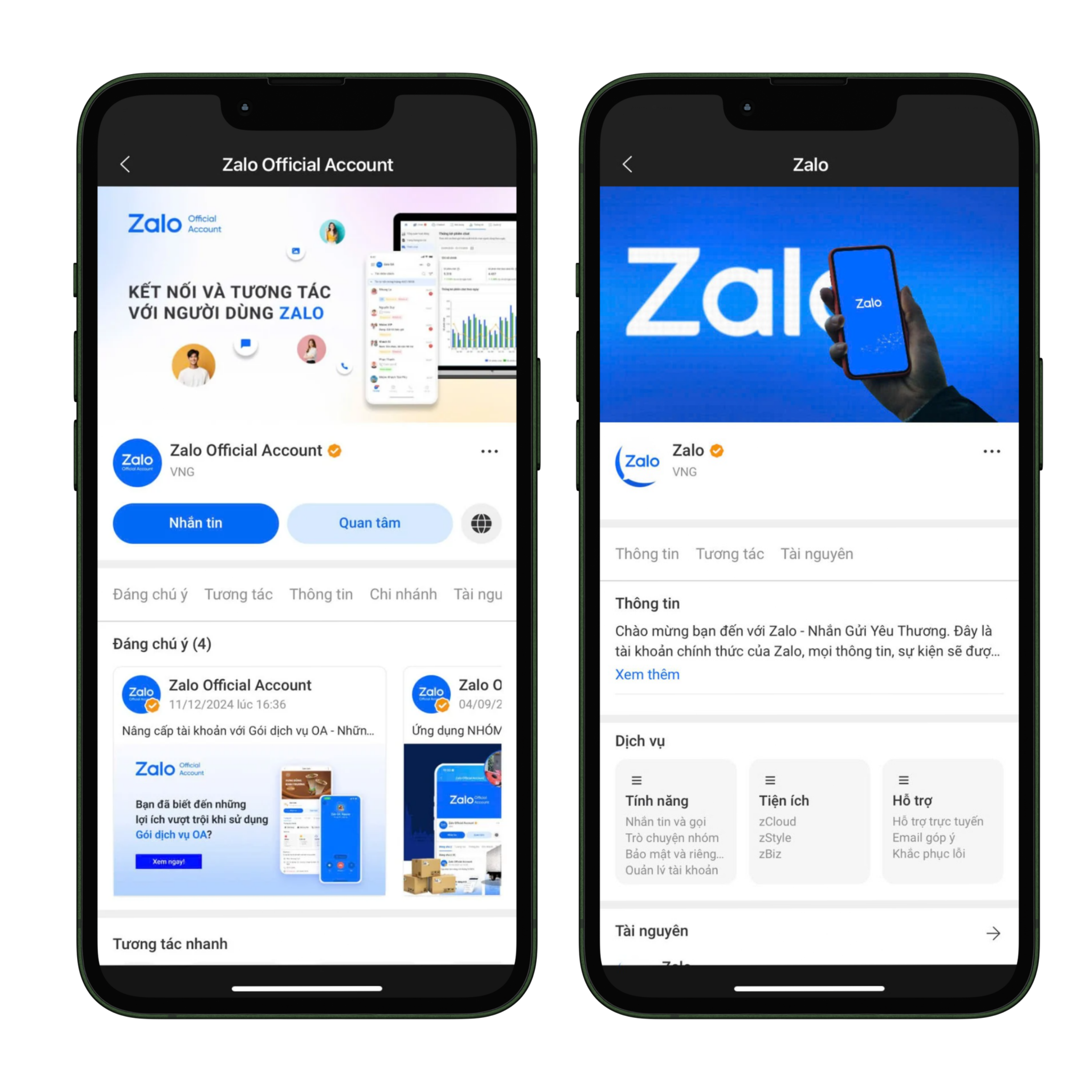
Zalo OA Interface
Currently, there are two popular types of OA for businesses:
- Lake Advertisement details: This is an account type for individuals or business households that do not yet have a Business Registration Certificate. It can only be used to run ads on Zalo and does not support features such as messaging, broadcasts, posts, chatbots, or voice calls. However, a Business License can be added to upgrade it to a verified OA and use all the functions.
- Verified OA: This is an account type for businesses or business households that already have a Business Registration Certificate. It is marked with a blue tick to increase credibility, allows multiple administrators to manage it on multiple devices, and supports all features to serve customer care as well as to develop online business.
- Higher credibility: The blue verification tick gives customers peace of mind when interacting.
- Full tools: Send messages, post articles, chatbot, voice calls, broadcast.
- Flexible management: Allows multiple admins to manage simultaneously.
- Supports online business: Combines with Zalo advertising to increase customer reach effectiveness.
- Go oa.zalo.me
- Log in using your personal Zalo account.
- Select Create Official Account.
- Use the Zalo app to scan the QR code to log in.
- Requirement: A verified Vietnamese phone number (+84) for your personal Zalo account.
- Activity Category: Please select the correct industry category that matches your business registration certificate or household business to avoid verification rejection.
- Official Account Name: The OA name must comply with Zalo's regulations. It can be the business/household business name as stated on the Business Registration Certificate, a brand name protected by the Intellectual Property Office, or the name of the product/service/project being sold if it does not fall into the two cases above.
- Introduction Information: The description should be concise, easy to understand, clearly show the industry, and not mislead viewers.
- Profile Picture: It should use the official logo or an image of a typical product or service so that customers can easily recognize the brand.
- Cover Photo: It should be an image directly related to the business field or products to increase professionalism.
- Verification by business or store name: Applies to legally registered businesses, households, stalls, or business locations.
- Verification by protected trademark: Applies when the business owns a trademark that has been granted a protection certificate by the Intellectual Property Office.
- Verification by specific industry: For businesses operating in conditional business fields or using names other than the two methods above.
- Businesses are only granted OA if they operate in a legitimate industry as regulated by Vietnamese law.
- Rejected areas include misleading or fraudulent financial activities such as binary options, virtual currency issuance, cryptocurrency trading, bidding-style auctions, or similar models.
- Businesses in the finance, banking, and insurance sectors are required to verify accounts before using OA, including but not limited to: credit, deposits, securities, e-wallets, payment intermediary services, Insurance, insurance agents, and tax services.
Benefits of Using a Verified OA
Upgrading and using a verified OA not only helps businesses meet legal requirements but also brings many practical benefits in brand building and customer development.
If businesses want to leverage Zalo as part of their strategy For multi-channel management, please see the article: 7 best multi-channel message management tools currently available
Zalo OA Business Registration Process
Step 1: Access and log in
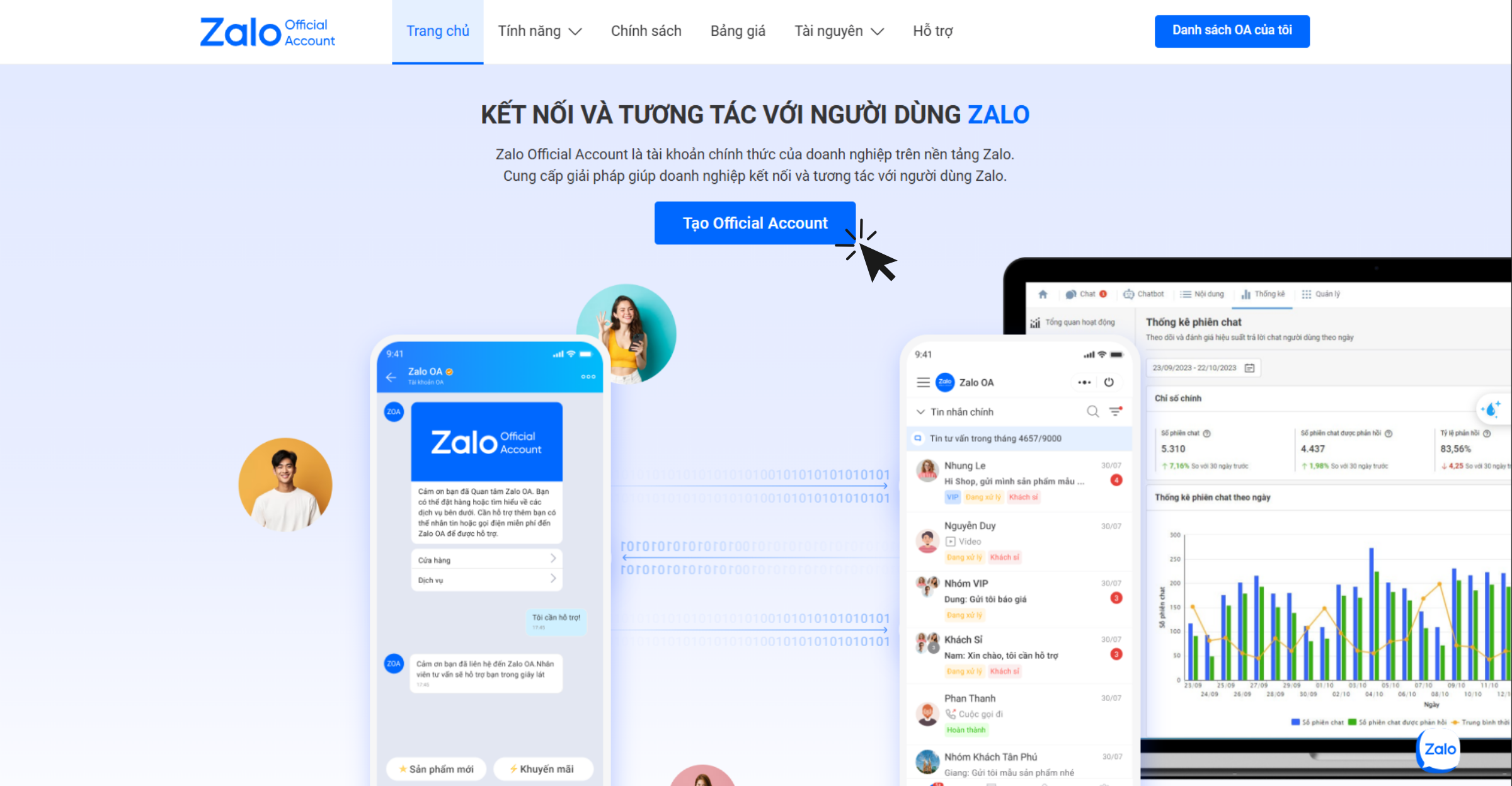
Access and log in to create Zalo OA
Step 2: Log in via QR code QR
Step 3: Fill in account information
When creating an OA, businesses need to enter all the required information to ensure accuracy and transparency:
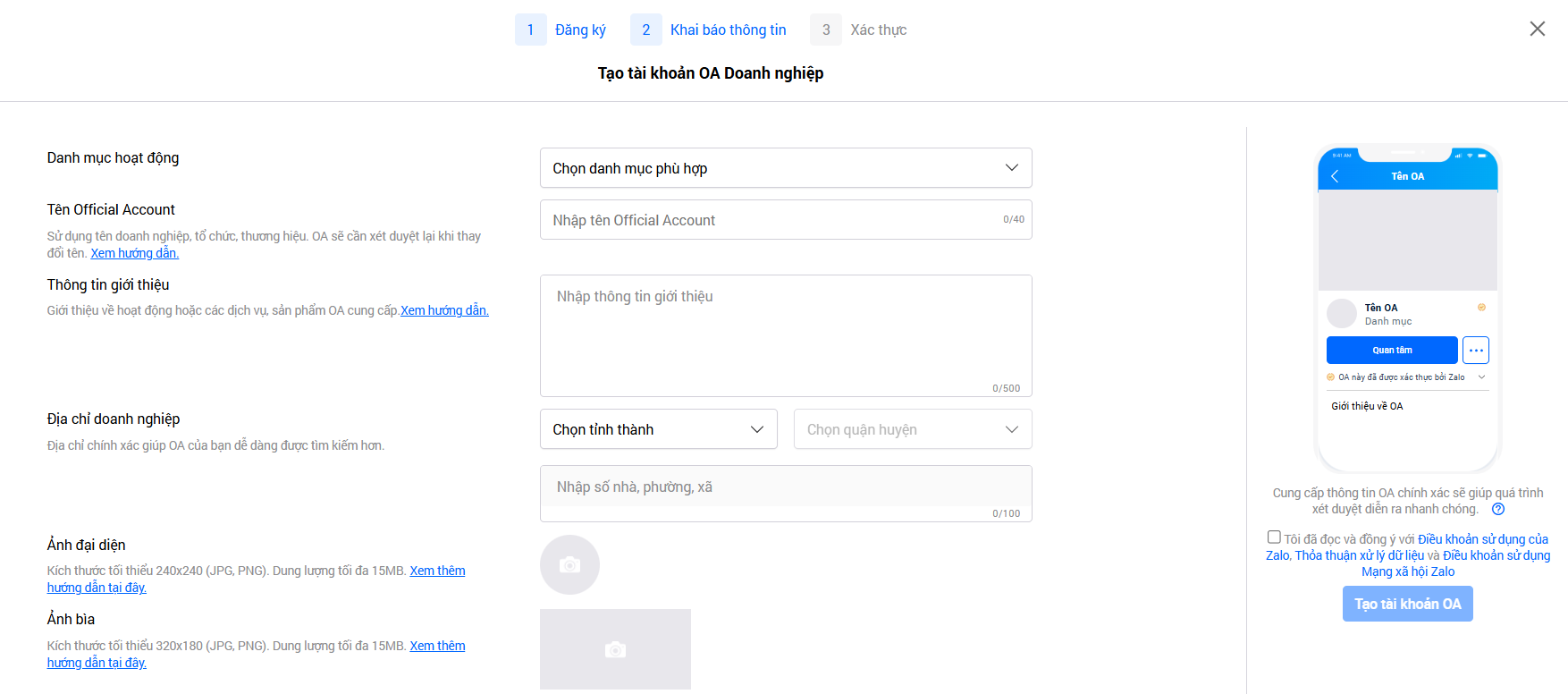
Declaring information valid with Zalo's policy
➞ Click
Create OA account.
Step 4: Verify OA
After successfully creating an OA, businesses need to verify it within 14 days To complete the registration process.
Once verified, the account will be marked with a blue tick and will be able to fully utilize the features supporting sales,
marketing, and customer care on Zalo.
There are three common verification methods:
After submitting the verification application, the administrator will receive a notification about the review time and results from the system.
OA Zalo Official Account. Typically, the response process takes 2-3 business days, but in
some cases it may
take longer.
Important Note:
To maximize traffic from Zalo OA, you can also check out:
Follow-up correctly, revenue increases automatically: How to "warm up" cold leads with Email Marketing
Conclusion
In the Vietnamese market, Zalo Official Account is an indispensable tool for businesses to build brand, maintain relationships with customers, and boost online sales. In particular, verified OAs not only strengthen trust but also unlock full features to support effective sales and marketing. Businesses should register and verify their Official Account (OA) today
to take full advantage of the power of the Zalo platform – a messaging app used daily by tens of millions of Vietnamese people.
Step 3: Fill in account information
When creating an OA, businesses need to enter all the required information to ensure accuracy and transparency:
Declaring information valid with Zalo's policy
➞ Click Create OA account.
Step 4: Verify OA
After successfully creating an OA, businesses need to verify it within 14 days To complete the registration process. Once verified, the account will be marked with a blue tick and will be able to fully utilize the features supporting sales, marketing, and customer care on Zalo.
There are three common verification methods:
After submitting the verification application, the administrator will receive a notification about the review time and results from the system. OA Zalo Official Account. Typically, the response process takes 2-3 business days, but in some cases it may take longer.
Important Note:
To maximize traffic from Zalo OA, you can also check out: Follow-up correctly, revenue increases automatically: How to "warm up" cold leads with Email Marketing
Conclusion
In the Vietnamese market, Zalo Official Account is an indispensable tool for businesses to build brand, maintain relationships with customers, and boost online sales. In particular, verified OAs not only strengthen trust but also unlock full features to support effective sales and marketing. Businesses should register and verify their Official Account (OA) today to take full advantage of the power of the Zalo platform – a messaging app used daily by tens of millions of Vietnamese people.
Maybe You Should Read These

Top 03+ lean business models "reign" during economic recession
Standard Google Ads Campaign Structure: Focus on optimizing costs and increasing conversion rates

What is a Cloud Call Center? How it works, what are the benefits, and why should you use Twilio?
Google Ads Recommendations: When to Listen, When to Ignore

Explode sales with 3 steps of standard customer data analysis